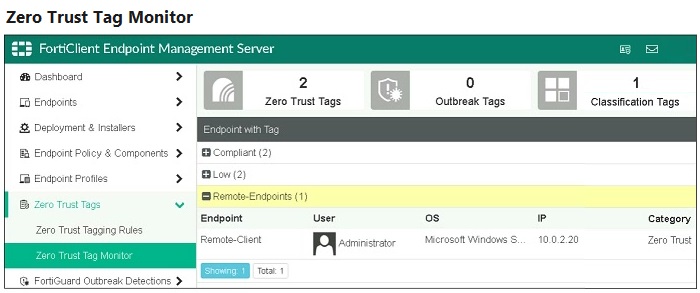
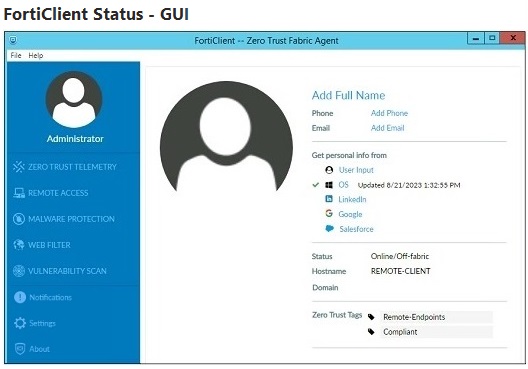
Refer to the exhibits, which show the Zero Trust Tag Monitor and the FortiClient GUI status. Remote-Client is tagged as Remote-Users on the FortiClient EMS Zero Trust Tag Monitor. What must an administrator do to show the tag on the FortiClient GUI?
Select an option, then click Submit answer.
Reference / correct answer:
Change the FortiClient system settings to enable tag visibility.
Most accepted answer: D. Change the FortiClient system settings to enable tag visibility.
Community votes: D=2
Selected Answer: D D is correct as explained here: https://docs.fortinet.com/document/fortigate/7.2.5/ssl-vpn-to-ztna-migration-guide/299214/prepare-forticlient-and-forticlient-ems-for-ztna Couldn't find any specific information regarding tag visibility in the student guide though. upvoted 1 times
A - Incorrect. EMS shared settings do not contain anything about ZTNA B - Incorrect. This is used to send email alerts if something is detected on an endpoint. C - The tagging rule logic is only to define the criteria for the tag to be applied. It does not control whether or not the tag is shown on the client. If you go into a tagging rule set and select the logic, there is no option to show/hide the tags. D - Correct. On EMS, if you go to Endpoint Profiles > System Settings > %profilename% You'll find the option to "Show Zero Trust Tag on FortiClient GUI" option when you click the Advanced tab on the top right. upvoted 2 times
Must be C.. At Zero Trust Tagging Rule Sets, yo active the Tag to be Present at the Forticlient upvoted 1 times TIGERZ44 1 year, 10 months ago No. The tagging rule logic is only to define the criteria for the tag to be applied. It does not control whether or not the tag is shown on the client. If you go into a tagging rule set and select the logic, there is no option to show/hide the tags. upvoted 1 times ...
No. The tagging rule logic is only to define the criteria for the tag to be applied. It does not control whether or not the tag is shown on the client. If you go into a tagging rule set and select the logic, there is no option to show/hide the tags. upvoted 1 times
Selected Answer: D D. Change the FortiClient system settings to enable tag visibility. upvoted 3 times
