You are using Microsoft 365 Copilot to enhance your productivity in Microsoft Teams. Which two tasks can you achieve by using Copilot in Teams? Each correct answer presents a complete the solution. NOTE: Each correct selection is worth one point.
Select an option, then click Submit answer.
○
Mute and unmute participants in a meeting based on their location.
○
Create a custom background and add the background to your video calls.
○
Create a meeting summary, including key decisions and action items.
○
Draft a response to a channel message based on the context of the conversation.
Reference / correct answer:
Draft a response to a channel message based on the context of the conversation.
Most accepted answer: D. Draft a response to a channel message based on the context of the conversation.

Community votes: C=2, D=3
Selected Answer: CD correct upvoted 4 times
Selected Answer: CD CD correct upvoted 4 times
Selected Answer: D My choice is D. What are your thoughts? upvoted 1 times
Question 2(Topic 3)
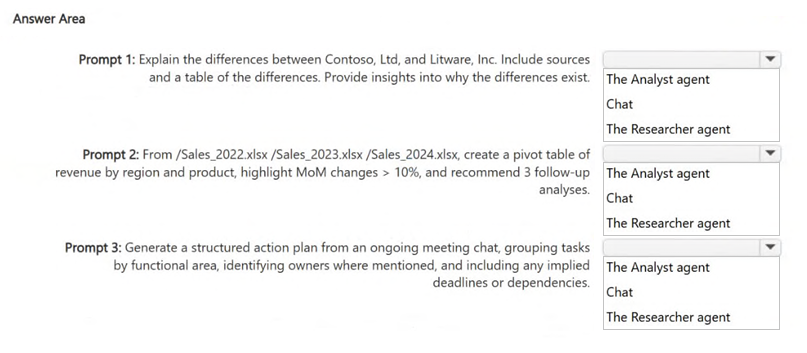
HOTSPOT - You have a Microsoft 365 Copilot license. You plan to run several prompts. What should you use to ensure that Copilot generates the best response for each prompt? More than one answer choice may achieve the goal. To answer, select the Best options in the answer area. NOTE: Each correct selection is worth one point.
Answer is in the explanation below.
Reference / correct answer:
B
Most accepted answer: B
Community votes: B=1
The Researcher agent The Analyst agent Chat upvoted 5 times
Selected Answer: B Pretty sure it's B. This pattern is very common. upvoted 1 times
Question 3(Topic 1)
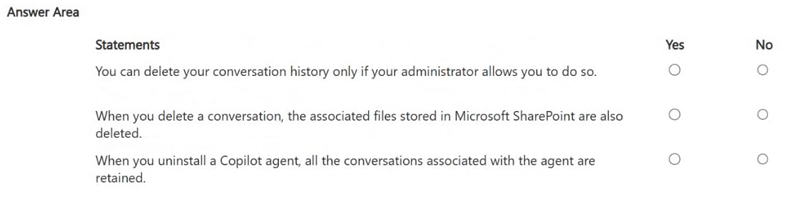
HOTSPOT - You use Microsoft 365 Copilot. For each of the following statements, select Yes if the statement is true. Otherwise, select No. NOTE: Each correct selection is worth one point.
Answer is in the explanation below.
Reference / correct answer:
You can delete your conversation history only if your administrator allows you to do so.❌ NoWhen you delete a conversation, the associated files stored in Microsoft SharePoint are also deleted.❌ NoWhen you uninstall a Copilot agent, all the conversations associated with the agent are retained.✅ Yes upvoted 7 times
✔️ Explanation 1. “You can delete your conversation history only if your administrator allows you to do so.” → NO Users can delete their own Copilot conversation history at any time. This action does not require admin approval. 2. “When you delete a conversation, the associated files stored in SharePoint are also deleted.” → NO Deleting a Copilot conversation does not delete any files in: SharePoint OneDrive Teams Files remain where they are stored. 3. “When you uninstall a Copilot agent, all the conversations associated with the agent are retained.” → NO Uninstalling a Copilot agent removes the agent and its associated conversations. They are not retained. upvoted 5 times
First one is Yes — You can delete your conversation history in Microsoft 365 Copilot only if your administrator has enabled this capability. upvoted 2 times
Limited Time Offer – Save Now!
Don’t miss out — get full access at the best price.